Øredev 2026

No researchers were harmed in the making of this test suite

Dora Makszy Dora MakszyHead of Design

Use ↓ Space to move forward, ↑ to go back, F for full screen

Contents

Overview

The problem · summer 2025

Sounds familiar?

We could not afford to guess. But we also could not afford to wait.

  • No available resources
  • No dedicated researcher
  • Too many unanswered questions
  • Limited time
  • Need evidence, not opinions

Theory & methods

Shine bright like a diamond

The Double Diamond is a visual representation of the design and innovation process.
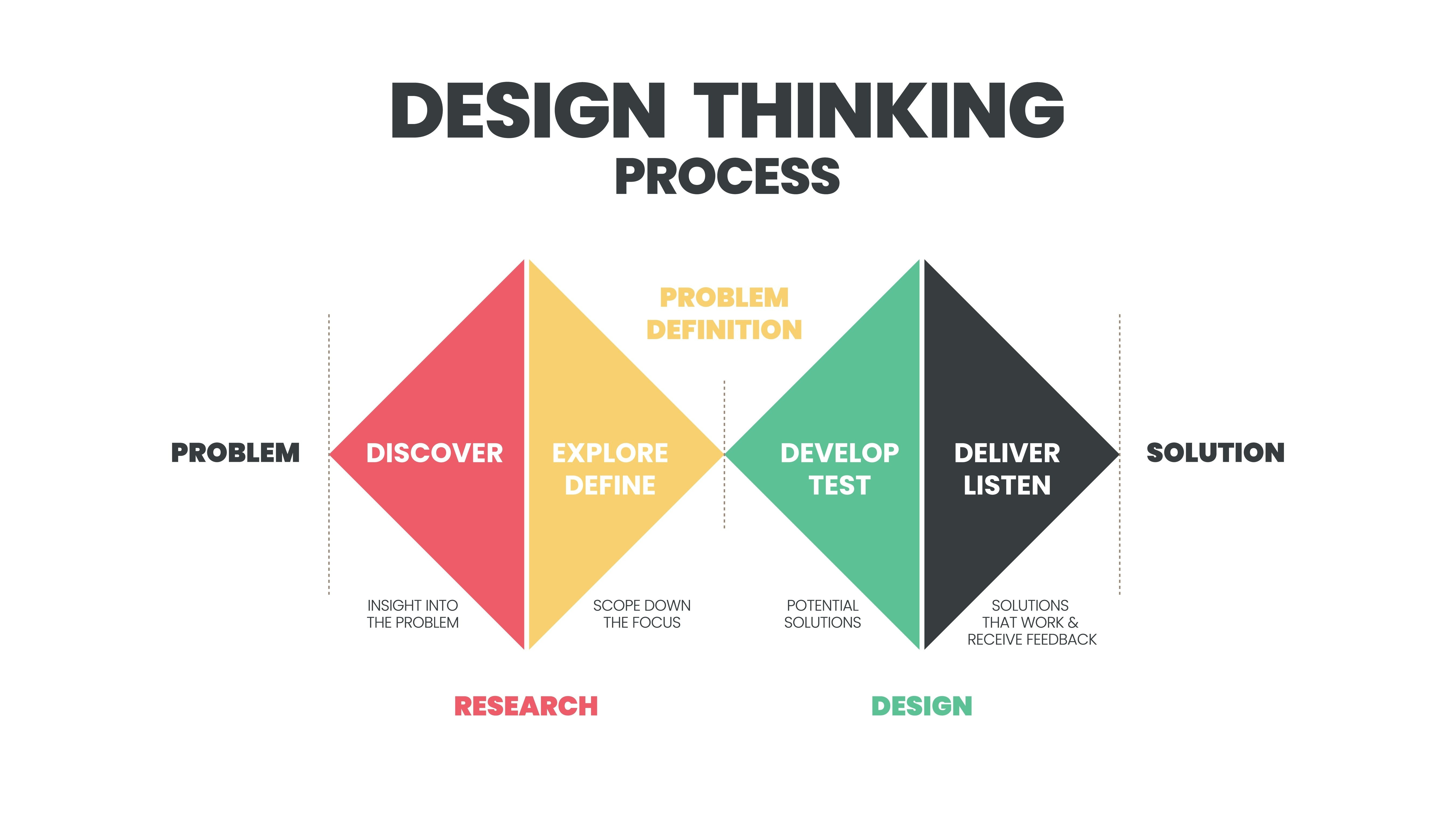
Double Diamond Process

Illustration by Sid Saladi

Theory & methods

UX research 101

Before you build, make sure it solves the right problem in the right way. UX research helps you evaluate and validate before you decide.

Click the card to compare.

Theory & methods

Methods in practice

Theory & methods

From problem to plan

Building the tool

Uhm, well.

Not everything worked on the first try.

    Building the tool

    Building the tool

    A structured command for the AI tool is basically a good definition of what you want to build and why.

    CContext: define the research goals and constraints. What problem are you solving? What are the limitations?
    RRole: specify the expertise level and perspective. Who is performing this task?
    AAction: describe the specific task to complete. What exact steps should be taken?
    FFormat: specify the output format and structure. How should the result be delivered?
    TTarget audience: define who will use or consume this. Who is the end user?

    Building the tool

    Getting there

    Open in new tab ↗

    Building the tool

    Roll it out

    Running the research: trusting the participants.

    1. 1.Participants should record themselves
    2. 2.Participants should share their screens
    3. 3.Participants should narrate what they think
    4. 4.Share recording and the exported data

    Value

    From CSV to insights

    complete_testing_results.csv
    Module,Tasks,Total time,Success rate,Clicks/Actions,Avg Task Time
    Search,4,35s,100%,25,9s
    Navigation,2,221s,100%,136,111s
    Versioning,3,56s,100%,6 / 6,19s
    
    NAVIGATION CARD SORTING RESULTS
    Category,Items Count,Is Custom,Items
    Inbound,2,No,Goods receiving; Incoming returns overview
    Outbound,4,No,Advance shipping notice; Order batching; Review order status; Reprinting
    Inventory,2,No,Inspection; Compression
    Control Room,13,No,Review inbound order status; Review outbound order status; Picking strategies; Conveyor status; Review process engine status; Robotic piece picking console; PLC Alerts; Set robot arm in maintenance mode; Staff planning; Shift planning; Alarm center; Review stock deviations; Review material master data
    Configuration,12,No,AutoStore grid configuration; Conveyor configuration; Configure picking workflow; Configure putaway workflow; Review external communications; Notification chain configuration; Change language settings; Define base units for length; Edit user privileges; Edit user roles; Add printing service; Add shipping service
    Insights,1,No,Robotic piece picking insight
    Settings,4,Yes,Software version; Get help; Create service ticket; Schedule software upgrade
    Logs,6,Yes,Order logs; Stock ledger; Audit trail; Event log; Printing log; Notification log
    ExportExtract data from the tool
    ConsolidateCombine multiple sessions
    AggregateGroup and summarize data
    AnalyzeFind patterns and insights

    Value

    The results

    • Test users could use the tool async with video recording
    • Data export available for analysis
    • Finished testing within one week

    Value

    Business value

    • AI handled busywork, humans handled critical thinking
    • Combined async quantitative data with in-depth qualitative interviews
    • Reduced time-to-insight from weeks to days
    • Data-driven decisions replaced gut feelings
    • Lower risk by validating before building
    • Established a reusable, scalable tool within one month

    One year later

    Same problem. Different tools.

    In 2025, AI helped me build a test. In 2026, AI sits inside the test, and the researcher still sets the bar.

    Summer 2025Version 1

    Figma Make builds a mock test tool. AI generates the prototype.

    2025 → 2026A business edge

    The findings turned into actionable steps. Since then the company has moved fully to smart use of AI, so the tool had to grow too.

    Autumn 2026Version 2

    Built with Claude, inside the real product. AI recommends, checks and drafts. The researcher decides.

    One year later

    What changed

    v1 · Figma Make, 2025v2 · Claude, 2026
    What to testI decided aloneClaude recommends, I decide
    Pass / fail barSet by hand, slow to define objectivelyClaude proposes targets per metric, I confirm them
    Test screensNewMock screens I drew by handThe real product, from my repository
    TasksNewInvented to fit the mockBuilt from the hypotheses and what the product can really do
    Task wordingChecked by meBias check flags leading task briefs
    AnalysisManual, from CSVMeasured against the targets, plus an AI draft
    Keeping it currentNewRebuild when the product changesEvolves with the code in the same repository
    Build timeAbout a monthHours to days

    One year later · Claude Code

    The test lives in the real product

    Claude builds the test into my own repository, so participants test the real thing, not a mock I drew.

    HypothesesI write what we need to learn
    Claude agentTurns each hypothesis into tasks that fit what the product can do
    RepositoryImplements the tasks and tracking next to the product code
    ParticipantWorks in the real interface
    ResultsMeasured against the targets I set
    No more mock screensI no longer invent and draw mock tasks, which used to take most of the time.
    Fewer misunderstandingsPeople react to the real product, so feedback is not lost in translation.
    Always up to dateThe test changes with the code, in the same repository.

    One year later · Test Suite 2.0

    AI recommends, humans decide

    • Start from the goal, the people and the hypotheses
    • Claude turns it into test scenarios that fit the product
    • Every suggestion is Apply or Skip
    • It warns you about weak methods
    CClaude · test set-up
    Hypothesis H1: a first-time user can tell where they are in Site Designer and what the screen is for. 6 supervisors, 20 minutes, async. Suggest test scenarios.
    C

    Here are three scenarios for H1, using what Site Designer can do today:

    1 · Where am I?First look at a configured layout. Ask where they are and what the screen is for.
    Applied
    2 · Find the controller“Conveyor C2 is not responding. Find out which controller it talks to.”
    Applied
    3 · Is it ready?An incomplete layout. Ask whether it is ready to go live.
    SkipApply

    A preference question alone will not tell you whether people can find their way. Pair it with a task.

    Reply to Claude…

    One year later · Test Suite 2.0

    Calibration: you set the bar

    • One exact target per metric
    • Each value shows its source: default, AI, or you
    • Your number always wins
    • Claude says why it suggests each value
    CClaude · calibration
    What should we measure for “Where am I?”, and what is a good bar?
    C

    I suggest these metrics. Pick the ones that fit:

    Task success ≥ 80%
    A common bar for a first-look task
    AI suggested
    Median time ≤ 60 s
    Useful later, when speed matters
    AI suggested
    SEQ ≥ 5.5 (1–7)
    How easy it felt
    AI suggested
    Confidence ≥ 4 (1–5)
    Spots people who are sure but wrong
    AI suggested
    Use success and SEQ, but set success to 90%.
    C

    Done. Success ≥ 90% set by you and SEQ ≥ 5.5 AI suggested. I will not change your value.

    One year later · Test Suite 2.0

    Bias check

    When tasks are written against the real product, menu names leak into the brief easily. Claude flags it.

    Task briefSite Designer: a conveyor layout with a PLC and a merge

    Before“Open Systems & PLCs and check which PLC conveyor C2 is linked to.”
    FlagIt names the menu and the steps. It tests whether people can follow instructions, not whether they can find their way.
    After“Conveyor C2 is not responding. Find out which controller it talks to.”

    One year later · Test Suite 2.0

    Judged, not interpreted

    Nothing new in UX research: we always measured against a bar set in advance. Now that structure is faster to set up.

    Before testing · the bar

    Task success≥ 90%
    SEQ (how easy it felt)≥ 5.5
    Median time≤ 60 s

    After 6 sessions · the result

    Task success 67%Not met
    SEQ 5.2Just missed
    Median time 48 sMet

    Example numbers, for illustration.

    One year later · Usability Lab

    Live demo: where am I?

    One task, three questions, then straight to the export.

    Choosing how to test

    You still choose how to test

    Classic methods still work. The AI-built tool gets its discipline from them; it does not replace them.

    Classic methods

    Moderated sessions, interviews, card sorting, paper prototypes.

    Proven. Needs people and time.

    This talk

    AI-built tool

    Built and adapted with Claude, runs async on the real product.

    Fast. Depends on an AI provider.

    Local model or your own build

    An open model on your own machines, or no AI at all.

    Predictable. Data stays in-house.

    Choosing how to test

    What AI does right now

    It makes us faster. It also makes us depend on things we do not control.

    It speeds us up

    • Working prototypes in hours
    • Analysis drafts in minutes
    • Less busywork for researchers
    • Tools that change with the product

    It creates dependencies

    • A provider you do not control
    • Models and prices that change
    • Data that leaves the building
    • Downtime that stops your study

    One year later

    Uhm, well. Again.

    Most of the 2025 failures are still true. These three are new.

    New in 2026

    • Accepting AI targets without asking why
    • Mistaking generated example data for real users
    • Letting the AI draft become the report

    Still true from 2025

      Value

      Rebuild this yourself

      01Define the problemWhat assumptions need testing?
      02Choose methodsMatch methods to questions
      03Decide metricsActionable metrics only
      04CalibrateSet the bar, let AI challenge it
      05Build in your repoClaude agent, real product
      06Collect asyncScreen + voice recording
      07ExportZIP, CSV and JSON
      08AnalyzeHumans find patterns

      Best practices

      • Use structured, constraint-driven prompts and iterate in small increments. Test early, validate AI outputs immediately, and treat AI as a collaborator, not a decision-maker.
      • Start with clear assumptions and hypotheses. Choose research methods based on what you actually need to learn, and understand what each method truly measures.
      • Measure observable behavior, not opinions alone. Combine quantitative and qualitative insights, and keep tasks realistic, focused, and unbiased.
      • Prototype failures are cheaper than production failures. Automate repetitive work, not critical thinking. Data alone is not insight; interpretation still matters.
      • New AI proposes targets, the researcher owns them. Write them down before the data arrive.
      • New Label generated data everywhere it appears, and never let a draft skip human review.

      Thank you ❤️

      Build your own!

      LinkedIn QR code

      LinkedIn

      Double Diamond Process

      Problem space

      Discover: Gather insights, understand users, explore the problem broadly

      Define: Synthesize findings, frame the right problem, narrow focus

      Solution space

      Develop: Ideate, prototype, test multiple solutions

      Deliver: Refine, finalize, ship the validated solution

      Prompt tricks

      When working with Figma Make, use clear and structured prompts to get the best results:

      Start with context:
      “Perform the following changes...”
      End with constraints:
      “Do not change anything else.”

      This approach ensures precision and prevents unintended modifications to your prototype.

      2026 With Claude: say what the tool may decide by itself and what the researcher decides. “Suggest targets, but never overwrite a value I set.”

      Prompt for Claude

      The same CRAFT idea, written in tags an agent can parse. Run it in Claude Code inside your product’s repository. Replace the CAPITALS.

      <context>
      I am a UX researcher. We run unmoderated, async usability tests on PRODUCT NAME,
      the web app in this repository. Participants: PARTICIPANT TYPE, NUMBER people,
      about SESSION LENGTH minutes each, screen and voice recorded.
      We have no dedicated researcher, so the tool must guide the study set-up as well as the session.
      </context>
      
      <role>
      Act as a senior UX researcher and a front-end developer who knows this codebase.
      </role>
      
      <hypotheses>
      H1: HYPOTHESIS 1
      H2: HYPOTHESIS 2
      </hypotheses>
      
      <task>
      Build a usability test tool in this repository, next to the product. It has three parts:
      1. Builder: read the product code and propose one or more tasks per hypothesis that use what
         the product can really do today. Suggest targets for each task (success rate, median time,
         SEQ) and flag task briefs that name menu items or describe the steps.
      2. Participant view: welcome and consent, then each task on the real product with a side panel
         (brief, "I'm done", "I give up", think-aloud reminder), then questions after each task:
         orientation check, SEQ (1-7) and confidence (1-5). Finish on a page that exports the results.
      3. Results: compare every metric with its target per task and per hypothesis
         (Met / Partly / Missed) and export ZIP, CSV and JSON.
      Add a small tracking probe to a test build of the product that reports clicks, dead clicks,
      navigation and visible errors to the tool. Keep it out of production builds.
      </task>
      
      <rules>
      - Never overwrite a target I set; show your suggestion next to it.
      - Never record typed text, only the kind of key pressed.
      - Label generated example data as examples wherever it appears.
      - The tool must also work without an AI connection.
      - Ask me before adding a new dependency.
      </rules>
      
      <format>
      Work on a new branch. Add a README that explains how to run a study.
      When you are done, list the tasks you created, the hypothesis each one tests,
      and anything in the product you could not test.
      </format>
      
      <audience>
      Researchers and designers set up the study. PARTICIPANT TYPE take it on a desktop,
      often with little time and mixed English skills.
      </audience>

      Video

      Not playing? Open it on YouTube